

Troubleshooting: Slack Invite Accepted but Nothing Happens
Last updated: Nov 10, 2026
0
views

The problem
A Slack user selects Confirm on a chat invitation from a Microsoft Teams user, but nothing happens. No channel for the Teams user appears in Slack.

Why it happens
The TeamsLink app creates a private Slack channel for each connection. If the Slack workspace doesn't allow members to create private channels, the connection fails without showing an error.
How to fix it
- In Teams: the Teams user clears the chat history in the group chat that was created for the Slack user. This removes what is left over from the failed attempt.
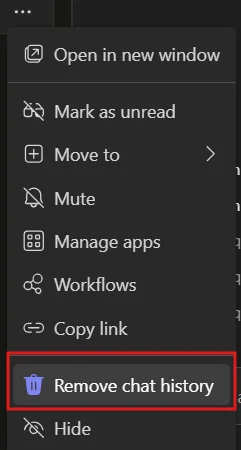
- In Slack: the Slack administrator allows members to create private channels. See Slack Administrators: Preparing Your Workspace for Teams Chat.
- In Slack: the Slack user selects Confirm on the invitation again.
If the channel still doesn't appear, contact CallHarbor Support.

